
Budgeting for leaving home
What can I actually spend?
Fledge is a simple budgeting app for the first time the money is yours to manage. Plan the week, key in what you spend, and always know what is left. No bank to connect, nothing to categorise.


99p, paid once. No subscription, no adverts. Listed as Fledge Budget.
Made for the first time it is all on you:
- Moving out
- Starting uni
- A first flat
- A first job
Plan it, live it, check it.
That loop is the whole app. Setting up takes about five minutes, and after that most days are one number and one tap.
01
Plan it
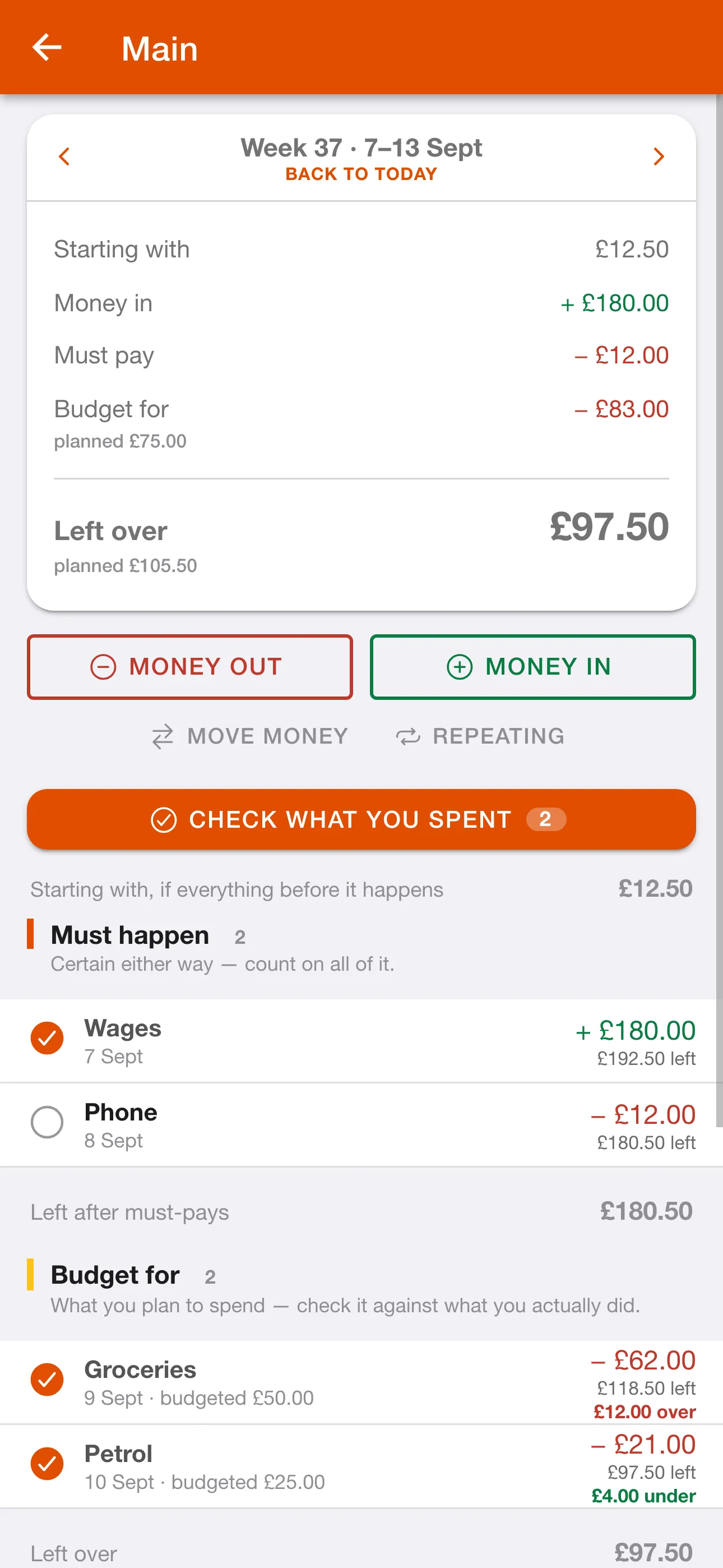
Put in what is coming in, what you must pay, and what you will budget for, like the shop and the petrol. Fledge does the sum and shows what is left.
02
Live it
Key in what you spend as you go. The number at the top is always what you can actually spend, and how far it stretches.
03
Check it
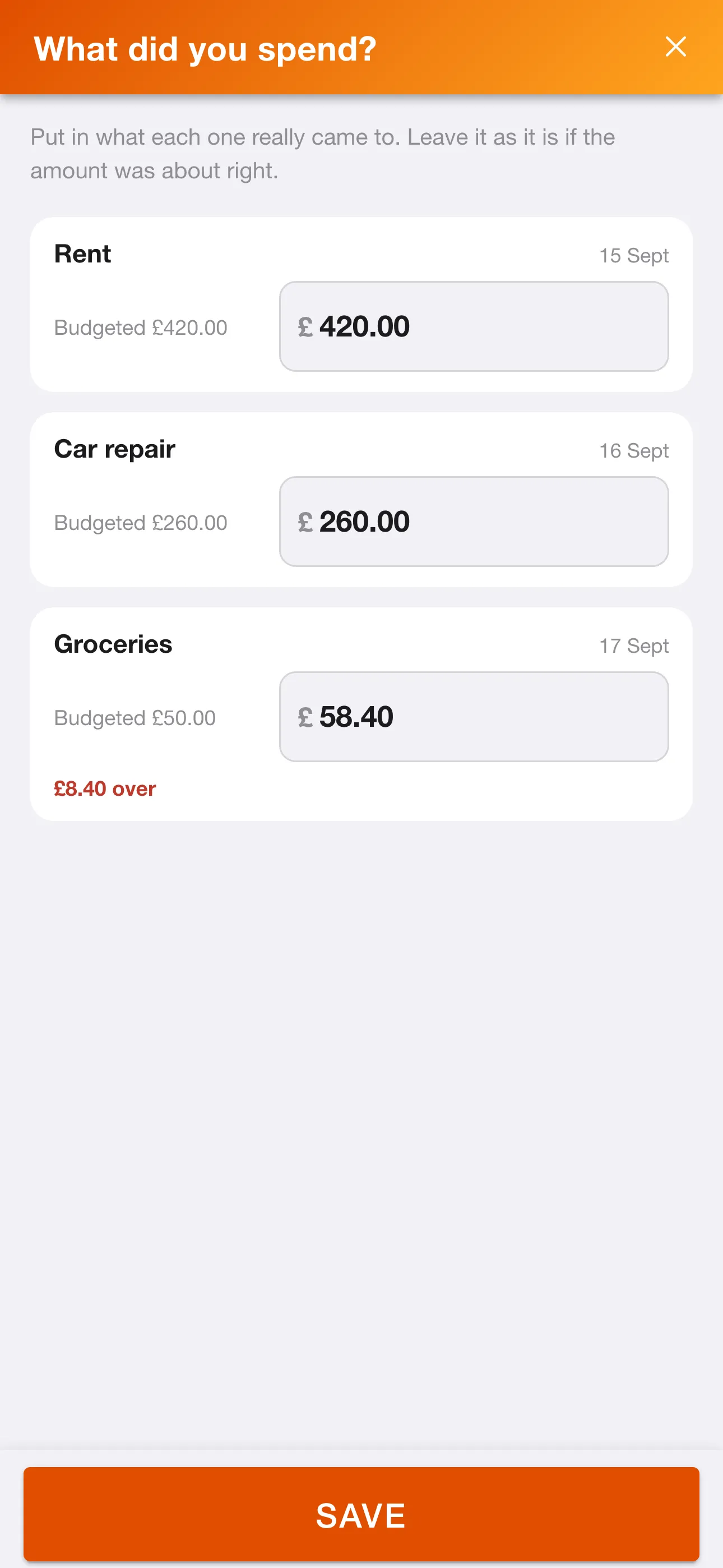
At the end of the week, put in what things really came to. Fledge shows where the plan and real life parted ways, so next week is a better guess.
Simple on purpose.
Not a finance dashboard and not a bank app. A calm place to see what you have to pay, what is coming in, and what is genuinely yours to spend.
Built around the week
A week is a size you can hold in your head, and plenty of people are paid weekly. Switch to months whenever you like. While you are in a week, Fledge still shows how the whole month is heading, so a monthly bill never arrives as a surprise.
Say how sure you are
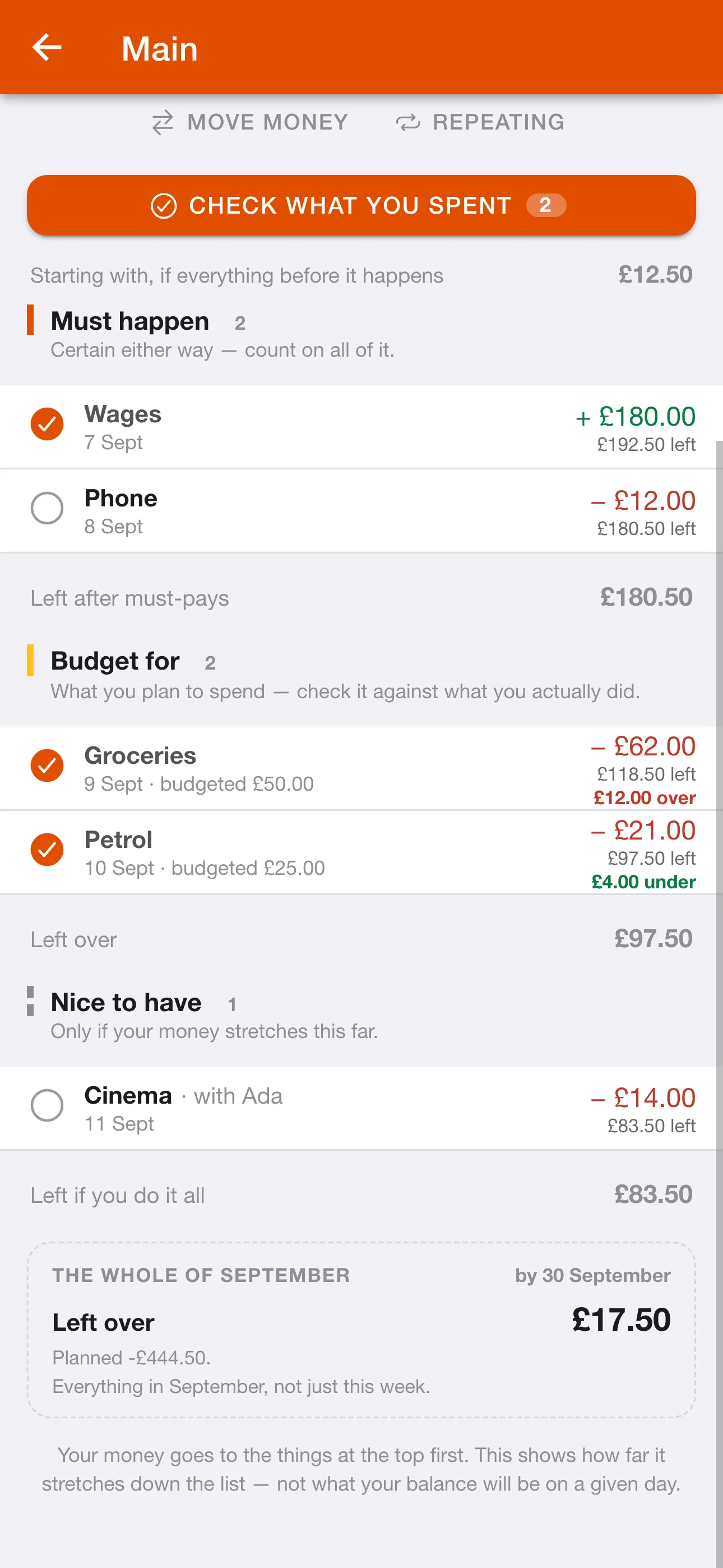
Not everything is a bill. Mark each thing Must pay, Budget for or Nice to have, and Fledge works down the list in that order, so you can see exactly how far your money stretches.
Told plainly when it will not fit
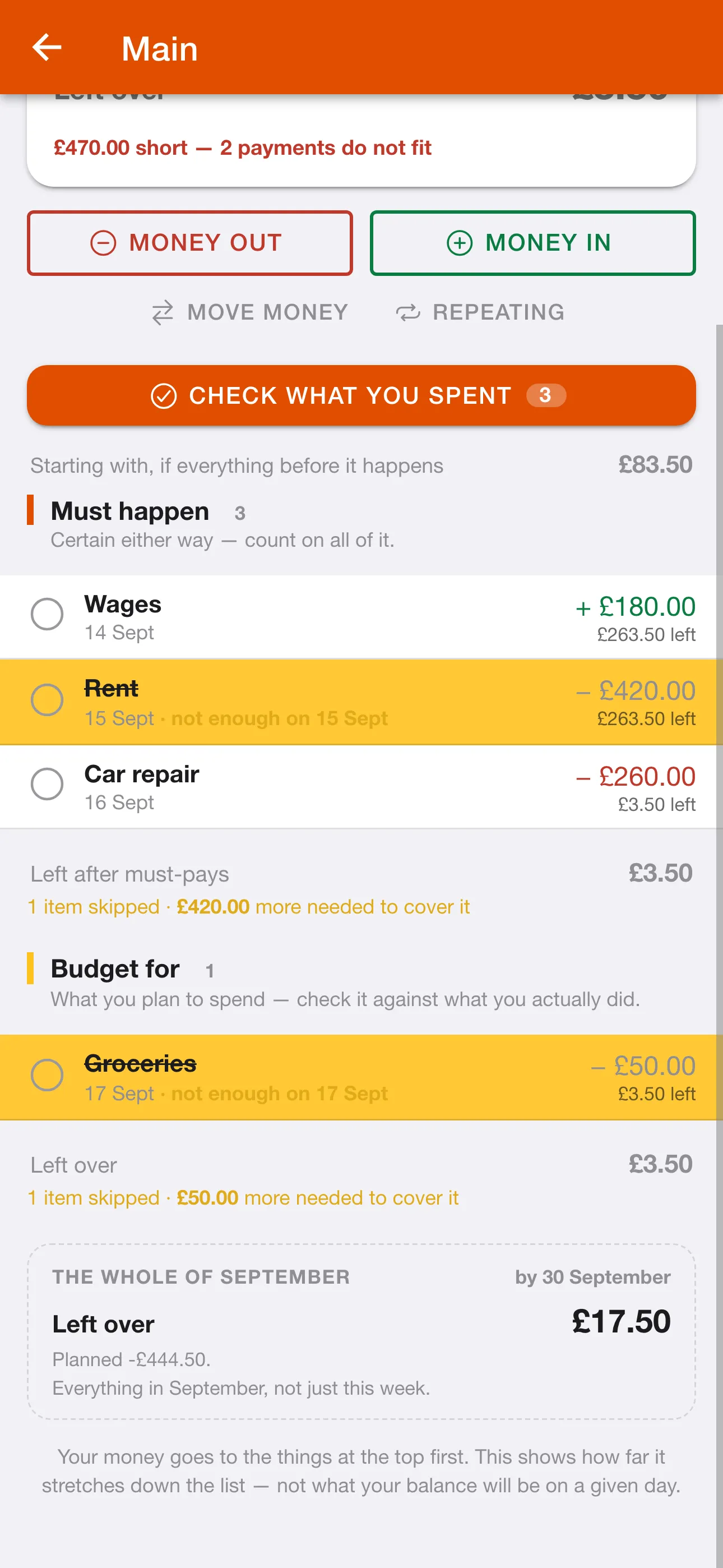
If the money runs out before it reaches something, that row is crossed out with the day it ran short. It is not an error. It is Fledge showing you the one you would have to drop.
What you really spent
Budget £50 for the shop, spend £62, and Fledge shows both. Under budget is celebrated as clearly as over. Week after week, the plan starts to match your life.
Savings pots
A festival, an emergency, a new phone. Each pot has its own target, and when a week leaves something over, Fledge offers to move it somewhere it will not quietly get spent.
Rent and bills, set up once
Anything that repeats, like rent, a subscription, a student-loan payment or payday, goes in once and turns up every time after that.
Spent something? Three taps
Tap 2, 5, 0 on the keypad and it is £2.50. There is no decimal point to hunt for. Add a word like Food or Drink if you want to, then tick it, and the number at the top drops straight away.
No bank login
Fledge never connects to your bank. Every figure is one you typed in, which is what keeps it quick, and what makes the numbers ones you trust.
Before it happens, not after
Know what will not fit while you can still do something about it.
A balance tells you what is in the account today. It does not tell you that the rent goes out on Friday and the car needs fixing on Saturday.
Fledge works down your list in order, must-pays first. When the money runs out before it reaches something, that row is crossed out with the day it runs short and how much more you would need. Then you can move money, put something off, or drop the nice-to-have, before it is a problem.
And while you are looking at the week, Fledge keeps an eye on the whole month, so a monthly bill never arrives as a surprise.
Pay once. That is it.
Most budgeting apps charge you every month to help you spend less. Fledge costs 99p, once, when you download it, and never asks again.
99p
paid once, on the App Store or Google Play
- Everything in the app, on iPhone or Android
- No subscription, and nothing to renew
- No adverts and no upsells
- Nothing sold or shared. Your figures are yours
See how it works before you buy
The whole app in seven steps, and a twelve-page guide covering every screen. The same guide is inside the app under the ? button.
Questions
Do I have to connect my bank?
No. Fledge does not connect to any bank and does not use Open Banking. Every figure in it is one you typed in.
Is it a subscription?
No. Fledge is 99p, paid once when you download it from the App Store or Google Play. There is nothing to renew and nothing to cancel.
Can I budget by the month instead?
Yes. Fledge starts on weeks, because a week is easier to keep track of and plenty of people are paid weekly. Switch to months in Account whenever you like.
What does “won’t fit” mean?
Fledge pays for things in order: must-pays first, then what you budget for, then the nice-to-haves. If your money runs out before it reaches something, that row is crossed out with the day it ran short. It is showing you what you would have to drop, not reporting a fault.
Who is it for?
Anyone managing their own money for the first time: moving out, starting uni, or into a first flat and a first job. It is simple on purpose, so it is quick enough to keep up with.
Is my data shared with anyone?
No. There are no adverts, no third-party analytics and no tracking. Your email address is used to sign you in, and your figures are used to run the app, and for nothing else.
Where can I get help?
The help page here walks through the app in seven steps, and the same guide is inside the app under the ? button. If you are still stuck, email support@icentricsystems.com and a person will answer.
Leaving the nest?
Know what you can actually spend, from the first week.